
·
Spotify
·
Spotify Ad Attribution: What the 14-Day Window Counts
Spotify counts a stream if someone who saw your ad plays your artist within 14 days. We cover what each Spotify ad report counts and misses.

MeansMGMT
Spotify Ads Manager counts a stream for a music ad when someone who saw or heard it plays at least 30 seconds of the promoted artist within 14 days. That's Spotify's own definition, from the Ads Manager reporting glossary (accessed October 2026), and it's the core of how Spotify credits a music ad.
A second window, 30 days, belongs to the Spotify Pixel and Conversions API. It counts actions on the advertiser's own website, app or offline channels, not plays inside Spotify. The two get mixed up, and they answer different questions. Our post on Ads Manager's self-serve formats covers the ad types.
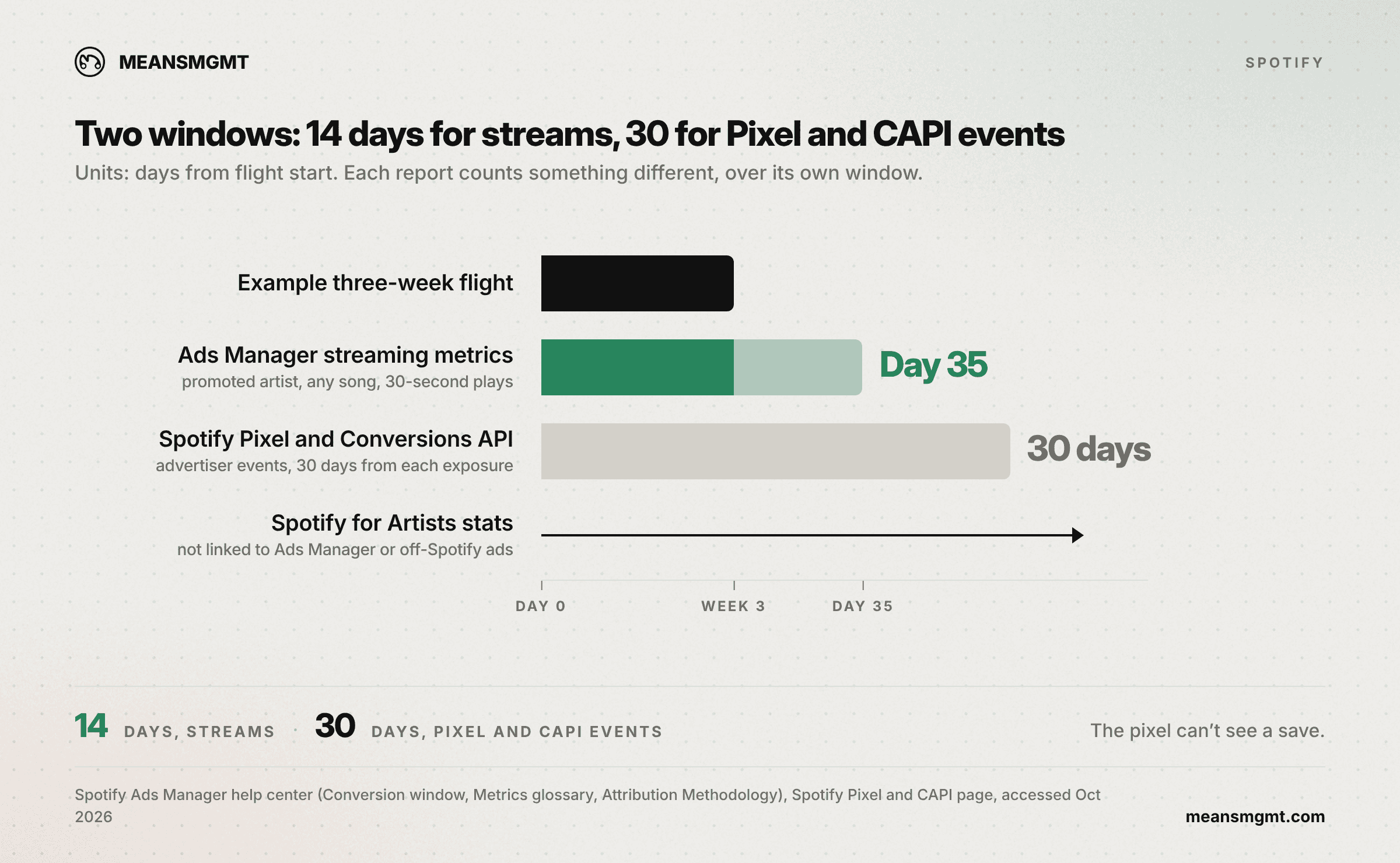
Two windows: 14 days for streams, 30 days for Pixel and CAPI events
Streaming conversion metrics on music ads are streams, listeners, new listeners and streams per listener. All of them use 14 days. Spotify's Conversion window page puts it at "the 14 days after a person heard the ad." The same page says the window "is fixed and can't be changed" (accessed October 2026). Spotify's 2020 explainer adds that "your campaign window is how long you set your ad to run plus 14 days." A three-week flight keeps counting streams until day 35, two weeks after the last impression.
The Pixel measures website events like page views, leads, adds to cart, purchases, sign-ups and custom events. The Conversions API sends website, app and offline events from the advertiser's server, per Spotify's Pixel and CAPI page (accessed October 2026). Spotify's Attribution Methodology page sets "a standard 30-day attribution window" for those events. Credit goes to the most recent Spotify ad exposure in the prior 30 days.
When you build a report, Ads Manager also lets you show conversions on a 7-day click and impression window instead of the 30-day default. Spotify says that setting changes the report only, not delivery or attribution (Ads Manager glossary, accessed October 2026).
The pixel can't see a save. A save happens inside the Spotify app and the pixel lives on a website, so no pixel setup will report saves on your release. A pre-save page can fire a custom event, but that records the click, not the save. A pixel on a smart link also only credits Spotify ad exposures. A visitor from a Meta ad counts only if that person also saw a Spotify ad in the prior 30 days, and the Spotify ad takes the credit.
A stream means the artist, any song, 30 seconds
The unit is the promoted artist. Say someone hears the ad for your new single, then plays a five-year-old song of yours for 30 seconds the next week. Ads Manager counts it (glossary, accessed October 2026). A release ad gets credit for catalog plays by everyone it reached.
Existing fans count too. A listener who plays you every week shows up in listeners and streams whether or not the ad changed anything. "New listeners" is the one metric that filters, limited to people who hadn't streamed the artist in the 28 days before exposure.
None of it shows up unless the ad set is built for it. Spotify's help page on streaming conversion tracking for artists walks through the setup. You pick the Engagement on Spotify objective, set the content type to Music, then search for the artist. Spotify presents that setup as the way to get artist streaming metrics.
Ads Manager's streaming metrics also have no holdout. Nothing in them compares exposed listeners' streams against a group that didn't see the ad. Spotify's Brand Lift surveys, in beta, measure recall and awareness, not streams. Ad Analytics' Conversion Lift uses a control group, but for website actions like sign-ups and purchases.
What each Spotify report counts
Five Spotify reports can touch a music campaign, and they don't share a unit.
Report | What it counts | Window | Unit |
|---|---|---|---|
Ads Manager streaming metrics | Streams, listeners, new listeners, streams per listener | 14 days after exposure, so flight + 14 days | Promoted artist, any song, 30-second plays |
Spotify Pixel and Conversions API | Page views, leads, purchases, sign-ups, custom events | 30 days (standard) | Advertiser website actions (Pixel), plus app and offline actions (CAPI), after a Spotify ad exposure |
Marquee and Showcase | Converted listeners, conversion rate, active streams per listener, intent rate | 14 days after seeing the campaign | Intentional streams of the promoted release's audio or its music video |
Discovery Mode | Listeners, new listeners, streams, saves, playlist adds, modeled lift estimate | Long-term engagement: 14 days from first exposure, updating for 14 days after the end | Songs heard in Discovery Mode contexts; new listener = no plays in 2 years |
Spotify for Artists stats | Source of streams (Release Radar counts in the algorithmic row), followers | Ongoing | Not linked to Ads Manager or off-Spotify ads |
Marquee and Showcase's main conversion metrics count intentional streams of the promoted release, where Ads Manager counts the whole artist (Spotify for Artists support, accessed October 2026). Their reports also show how listeners engaged with your other releases. So a Marquee result and an Ads Manager result for the same release count different things, even over the same 14 days. Marquee's and Discovery Mode's new listeners need two years without a play (Discovery Mode report guide, accessed October 2026). Ads Manager's need 28 days.
Spotify for Artists' stats pages are where the source-of-streams rows live. Nothing there links a stream to Ads Manager or to an ad off Spotify. Marquee, Showcase and Discovery Mode results sit apart, in its Campaigns tab. We wrote up what the source-of-streams rows can and can't tell you in what your Spotify for Artists ad data can tell you.
Thresholds and lag: why day one looks empty
Metrics start populating about 24 hours after an ad set starts, then refresh every few hours (Population of metrics, accessed October 2026). Spotify's reporting thresholds page sets a floor under that. A delivery insights row stays a dash until the ad passes 500 impressions and 100 reach, and conversion data needs at least 5 conversions. Streaming conversion metrics in those delivery insights follow the same floor, but Spotify says the artist streaming results don't.
A small budget split across several ad sets can leave each one's breakdowns and conversions under that floor. Spotify says a dash means below threshold, not a reading of zero. For conversions, the real count is anywhere from 0 to 4.
Streams also keep landing for 14 days after each exposure, so the last day of a flight still has two weeks of counting ahead. Spotify's Ads API reference tells developers to stop retrying a report about two weeks after the ad's end date (accessed October 2026). Marquee and Showcase final results are ready 2 weeks after the campaign ends (Spotify for Artists support, accessed October 2026).
A number pulled the day a flight ends is a partial count. If you budget backwards from a cost per stream, as we suggest in our cost per stream and save breakdown, wait for the window to close before you divide.
What the reports can't prove
Ads Manager's streaming totals don't show how many streams the ad added, and their count stops at day 14. None of the five reports above measures streams against a holdout. Discovery Mode shows a stream lift estimate, but it comes from Spotify's machine learning model, not a control group.
Our clients see their ad results and their Spotify for Artists numbers side by side, in dashboards we build for them. That's where we check each campaign against the artist's own history.
On cause, an exposed fan who would have played you anyway still counts, and there's no holdout to subtract them. On timing, Spotify's own research links saves and playlist adds to a 2.5x increase in streaming of an artist six months later (Spotify for Artists support, accessed October 2026). Spotify reports that as an association, and six months is far past every window above.
For the Spotify for Artists post, we lined up 18 Meta streaming pushes against 704 overlapping 30-day stretches with no recorded Meta spend, across 4 artists. During the pushes, average daily streams ran a median 1.34x their average for the 28 days before. The stretches, measured the same way and weighted to match where the pushes happened, ran 0.84x. Pushes came out ahead for 3 of 4 artists (MeansMGMT internal S4A data, 9-artist set, 2026 re-audit).
With four artists, that's a direction, not a test. Three or more of four would come out ahead about a third of the time by chance alone. There's no holdout in that comparison either, so the direction is more trustworthy than the size. "No recorded Meta spend" means Meta only, and TikTok and YouTube spend isn't in those records.
I wait two weeks minimum after a flight ends before I tell a client what it did. For streaming reports, that lines up with the 14-day window, and Spotify's help center says to wait for the attribution window to end for full results. Website conversions on the Pixel or CAPI need their 30 days to close.
The window closes before the release is done
A release campaign usually pays off outside streams, in tickets, merch and a mailing list. Those can take months, and the 14-day count stops long before them. Part 2 covers whether to keep spending after the release, and when a catalog song earns evergreen budget.
Engagement on Spotify is the campaign objective, and Spotify's optimization page lists two delivery goals under it. Streams is described for podcast or video content, and Clicks for people likely to click. Neither is described as optimizing for plays of an artist's music. So pull your final numbers 14 days after the last impression.
If you want a second set of eyes on a Spotify campaign report, or want one set up so the numbers mean something, reach out at meansmgmt.com.
Notes
Definitions come from Spotify's Ads Manager help center, Spotify Advertising, Spotify for Artists support, Spotify Ad Analytics and the Spotify Ads API reference. All were accessed October 2026 and rechecked October 15, 2026. Where a Spotify page is undated, the access date stands in. The same-artist comparison counts Meta campaigns only, and every artist in it is anonymized.
FAQ
Questions we get
If you have a release coming, start your campaign now or book a call first, and we’ll scope it with you. Want the numbers first? The benchmarks report is free.

